
📊 Full opportunity report: Quiet GPUs for Local AI: Acoustic and Thermal Roundup on ThorstenMeyerAI.com — validation score, market gap, and execution plan.

Get hardware and tech essentials delivered free — and shop member deals
- Fast, free delivery on millions of items
- Access to Prime Big Deal Days deals on October 6–7
- Prime Video, Amazon Music and more included
TL;DR
This article reviews the most silent and thermally efficient GPUs for local AI use in 2026. It highlights how undervolting and cooler design influence noise and heat, with specific models suited for various VRAM needs.
In 2026, the most effective GPUs for local AI are those optimized for low noise and heat, with the RTX 5090 (32GB) leading in performance and cooling potential when properly undervolted and paired with high-quality cooling solutions.
This roundup emphasizes that GPU noise and heat are as critical as raw performance for local AI setups. For more details, see our guide on best thermal paste and pads for high-TDP GPUs. The RTX 5090, with 32GB of GDDR7 memory and a 575W TDP, is identified as the top choice for large-scale inference, provided it is power-capped and paired with a high-quality, triple-fan cooler with zero-RPM idle mode. Lower-tier options like the RTX 4090 (24GB) and used RTX 3090 are noted for their affordability and reliability, especially when undervolted and cooled properly. For efficiency and smaller models, the RTX 5080 and RTX 4060 Ti (16GB) offer low power draw and minimal heat, making them ideal for quieter, cooler setups. The RTX PRO 6000 Blackwell (96GB) is highlighted as a professional-grade option for dense, large-model deployments, offering significant VRAM capacity with a focus on thermal management.Quiet GPUs
for local AI.
The GPU makes ~70% of your heat and most of your noise. But here’s the secret: the chip doesn’t decide how loud your card is — the cooler design and your power settings do. Match your VRAM tier in Part 2, then make it quiet.
Capping to 70–80% sheds a huge amount of heat for almost no inference loss — because inference is memory-bound. A capped 5090 is dramatically cooler & quieter than stock. Do this first.
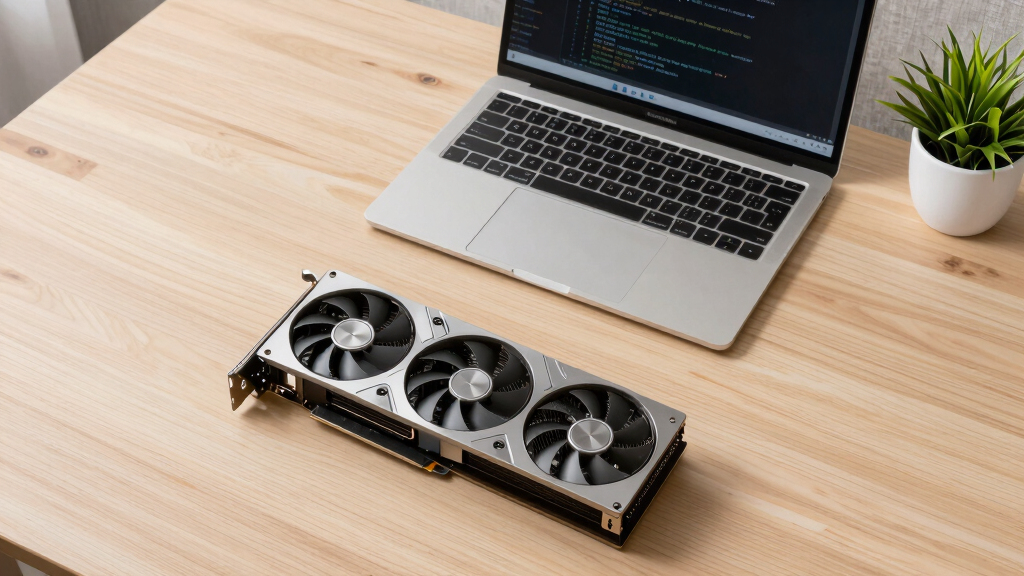
Within one GPU model, partner cards differ enormously. For a single card, a large triple-fan open-air with zero-RPM idle runs slow & quiet. For multi-GPU, the calculus flips →
With room to breathe, a large triple-fan open-air cooler spreads heat across a big fin stack and runs its fans slowly. The quietest choice — what most people should buy.
Why Quiet, Cool GPUs Matter for Local AI Setups
Effective cooling and noise reduction are vital for users running AI inference locally, especially in office or home environments. Proper undervolting and cooler selection can dramatically decrease heat output and fan noise, improving user comfort and hardware longevity. Learn more about thermal management solutions for GPUs. This is crucial as models grow larger and more demanding, making thermal and acoustic management a key factor in GPU selection and configuration.As an affiliate, we earn on qualifying purchases.
2026 GPU Landscape and Cooling Strategies
Historically, high-performance GPUs for AI have been plagued by excessive heat and noise, often limiting their usability in quiet environments. The trend in 2026 emphasizes undervolting and better cooler designs to mitigate these issues. The RTX 5090 stands out as the premier consumer GPU, capable of handling large models with proper thermal and power management. Meanwhile, mid-tier options like the RTX 5080 and 4060 Ti continue to offer efficient performance for smaller models, while professional-grade cards such as the RTX PRO 6000 Blackwell provide massive VRAM for dense deployments. The importance of partner cooler design and power capping has become central to achieving quiet operation."Undervolting and selecting the right cooler are the most effective ways to reduce GPU noise and heat, regardless of the silicon used."
— Thorsten Meyer, AI hardware expert
As an affiliate, we earn on qualifying purchases.
Uncertainties in Long-Term Thermal and Acoustic Performance
It is not yet clear how sustained operation over months or years will affect the long-term reliability of undervolted, cooled GPUs. Variations in cooler quality between partner models may also influence real-world noise and heat levels, and new cooling technologies could further change the landscape.
As an affiliate, we earn on qualifying purchases.
Next Steps for Achieving Quieter, Cooler AI GPUs
Manufacturers are expected to release more partner cards with optimized cooling and lower noise profiles. Check out our article on best cooling options for high-performance GPUs. Additionally, software updates for better power management and further cooling innovations could improve thermal and acoustic performance. Users should monitor new releases and consider undervolting and cooler selection as part of their GPU setup for AI workloads.
As an affiliate, we earn on qualifying purchases.
Key Questions
How does undervolting impact GPU noise?
Undervolting reduces the power consumption and heat generation of the GPU, which in turn allows the cooling fans to operate at lower speeds, decreasing noise levels without significantly impacting inference performance.
Is the RTX 5090 suitable for quiet home AI setups?
Yes, when power-capped and paired with a high-quality cooler, the RTX 5090 can run quietly and cool enough for home or office environments, despite its high TDP.
Are used GPUs like the RTX 3090 still viable for quiet AI work?
Yes, the used RTX 3090 offers good VRAM and can be made quieter through undervolting and quality cooling, making it a cost-effective option for many users.
What are the main factors influencing GPU noise and heat?
The key factors include cooler design, fan quality, power settings, and undervolting. Proper combination of these can significantly reduce noise and heat output.
Will new cooling technologies change the landscape?
Future innovations in cooling and thermal management could further improve noise and heat performance, but current best practices focus on undervolting and selecting partner cards with optimized coolers.
Source: ThorstenMeyerAI.com
Halloween Picks
halloween
As an affiliate, we earn on qualifying purchases.