📊 Full opportunity report: Mac vs GPU Tower for Local LLMs: The Heat-and-Noise Tradeoff on ThorstenMeyerAI.com — validation score, market gap, and execution plan.
TL;DR
This article compares Mac Studio and GPU tower setups for running local large language models, focusing on heat, noise, performance, and upgradeability. The choice depends on model size, throughput needs, and environmental factors.
Apple Silicon Macs, such as the Mac Studio with M3 Ultra, are significantly quieter and produce less heat than GPU towers equipped with high-end NVIDIA cards like the RTX 5090, but they come with different performance and capacity tradeoffs.
The core difference lies in architecture: GPU towers prioritize memory bandwidth, enabling faster inference on models that fit within their VRAM (24-32GB per card), resulting in higher token throughput. Conversely, Macs leverage unified memory architecture, offering up to 512GB of capacity, allowing them to run larger models, such as 70B+ quantized models, that cannot fit into a single GPU.
GPU towers consume hundreds of watts (575W to over 800W), generating substantial heat that requires complex cooling solutions and ongoing thermal management. They are capable of multi-GPU scaling, providing maximum throughput for models within VRAM limits, and support native CUDA ecosystems for development and fine-tuning. However, they demand significant effort to manage noise and heat.
Macs, by contrast, operate near-silently with minimal power draw, making them ideal for always-on, quiet environments. They are fixed at their purchase configuration, with no upgrade path for GPUs, but excel at running large models that exceed GPU VRAM limits. Their ecosystem is more limited, but improving, with a focus on ease of use and low maintenance.
Mac vs GPU tower
for local LLMs.
What if you sidestep the heat entirely with a different kind of machine? A tower is a high-bandwidth furnace you spend five levers quieting. Apple Silicon is near-silent by design — but asks for different tradeoffs. Match your priority in Part 2.
Put the loud, hot machine where its noise doesn’t matter, and the quiet one where you do. SSH into the tower when you need raw power; let the Mac handle everything else, silently.
Impact of Hardware Choice on Local AI Deployment
Understanding these differences helps AI practitioners choose the right hardware based on workload requirements, environmental constraints, and upgrade plans. For high-throughput, latency-sensitive tasks involving models that fit in VRAM, GPU towers offer superior performance. For large models, power efficiency, and quiet operation, Macs provide a compelling alternative, especially for desk-side, always-on setups.
This decision influences not only performance but also operational costs, noise levels, and long-term flexibility, making it a critical consideration for anyone deploying local large language models.

Apple Mac Studio, M3 Ultra 32-Core CPU / 80-Core GPU, 256GB Unified Memory, 8TB SSD
- Performance: Up to 32-core CPU and 80-core GPU
- Display Support: Supports up to 8 displays at 8K
- Memory Capacity: Up to 512GB RAM
As an affiliate, we earn on qualifying purchases.
As an affiliate, we earn on qualifying purchases.
Architectural and Performance Foundations of Mac and GPU Systems
The debate between Mac Silicon and GPU towers centers on fundamental architectural differences. GPU towers, with their high memory bandwidth, excel at inference speed for models within VRAM limits but are power-hungry and generate substantial heat. They are designed for maximum throughput, fine-tuning, and ecosystem compatibility via CUDA.
Macs, with their unified memory architecture, prioritize capacity over raw bandwidth, enabling them to load and run larger models that are impossible on a single GPU. Their low power consumption and near-silent operation are by design, making them suitable for continuous, quiet environments. This contrast underscores a broader philosophical divide: performance versus practicality and environment.
"The heat and noise tradeoff isn’t just about cooling — it’s about fundamentally different philosophies of computing, especially when choosing between a GPU tower and a Mac for local AI."
— Thorsten Meyer
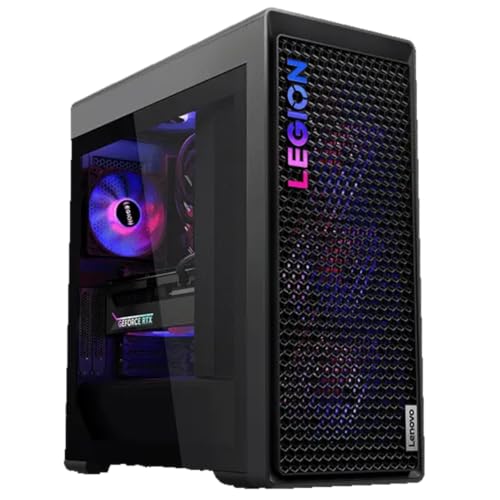
Lenovo Legion Tower 7i Gen 10 Gaming Desktop PC (2026 Model) - Intel Ultra 9 285K 24-Core, NVIDIA RTX 5090 32GB, 64GB RAM, 2TB NVMe SSD, 1200W PSU, Liquid Cooling, Windows 11 Pro
- Processor: Intel Core Ultra 9 285K, up to 5.50 GHz
- Operating System: Windows 11 Pro 64-bit
- Graphics Card: NVIDIA RTX 5090 32GB GDDR7
As an affiliate, we earn on qualifying purchases.
As an affiliate, we earn on qualifying purchases.
Unresolved Questions About Long-Term Scalability
It remains unclear how future developments in Apple Silicon or GPU architectures will shift these tradeoffs, particularly regarding model size, ecosystem support, and thermal management innovations. The long-term upgradeability of Mac systems, especially GPU expansion options, is also uncertain.

Andromeda Insights - AI Workstation Gaming PC | AMD Radeon Pro R9700 32GB | Ryzen 5 9600X (5.4 GHz Turbo) | 32GB DDR5 | 1TB Gen4 SSD | W11 | Wi-Fi | Bluetooth - Black
- AI-Optimized Workstation: Designed for demanding AI workloads
- Powerful CPU: AMD Ryzen 5 9600X with 5.4GHz Turbo
- High-Performance GPU: AMD Radeon Pro R9700 with 32GB VRAM
As an affiliate, we earn on qualifying purchases.
As an affiliate, we earn on qualifying purchases.
Future Developments and Hardware Innovations
Upcoming hardware releases from Apple and NVIDIA could alter these tradeoffs, potentially offering higher capacity or better thermal management. Monitoring these developments will be key for AI practitioners planning long-term deployments.

GEEKOM A9 Mega AI Workstation Desktop PC, Ryzen AI Max+ 395 for Local LLM
- Limited Supply of Ryzen AI Max+ 395: First to integrate this high-performance chip
- Exclusive 126 TOPS AI Performance: Unlocks advanced local large language models
- 3-Year Professional Warranty: Extended coverage with rigorous testing
As an affiliate, we earn on qualifying purchases.
As an affiliate, we earn on qualifying purchases.
Key Questions
Can a Mac run the same models as a GPU tower?
Large models exceeding GPU VRAM, such as 70B+ quantized models, can run on Macs with sufficient unified memory (up to 512GB), but inference speeds will be slower compared to GPU towers.
Is noise a significant concern with GPU towers?
Yes. GPU towers generate substantial heat requiring fans and cooling solutions, which can produce noise unless carefully managed. Macs operate near-silently by design.
What about power consumption and heat?
GPU towers consume hundreds of watts and produce significant heat, demanding complex thermal management. Macs, by contrast, use minimal power and produce little heat, suitable for quiet, always-on environments.
Can I upgrade a Mac to handle larger models in the future?
No. Mac systems are fixed at purchase with no GPU expansion options. Upgrading involves replacing the entire system, unlike GPU towers which can add or swap cards.
Which hardware is better for training models?
GPU towers with CUDA ecosystems are better suited for training and fine-tuning due to native support and scalability. Macs are primarily optimized for inference workloads.
Source: ThorstenMeyerAI.com