
TL;DR
Building your own AI workstation used to be cheaper, but component shortages and price spikes in 2026 now often make prebuilt systems just as cost-effective. The choice boils down to control, time, and support, not just price.
Imagine a machine that hums quietly, its dark, sleek case glowing with LED accents, ready to crunch through massive AI models. Now ask yourself: do you build this machine yourself, tuning every fan curve and undervolting each GPU? Or do you buy a preassembled, tested, ready-to-rocket system from a vendor?
Deciding between these two paths has never been more relevant, especially when considering Build vs Buy a Prebuilt AI Workstation. With the AI boom pushing hardware prices up and component shortages hitting supply chains, the age-old wisdom — “build cheaper, buy faster” — no longer holds as firmly. Your choice now isn’t just about saving money; it’s about balancing time, control, and support. This guide breaks down the real tradeoffs, so you can pick the right route for your AI projects in 2026.
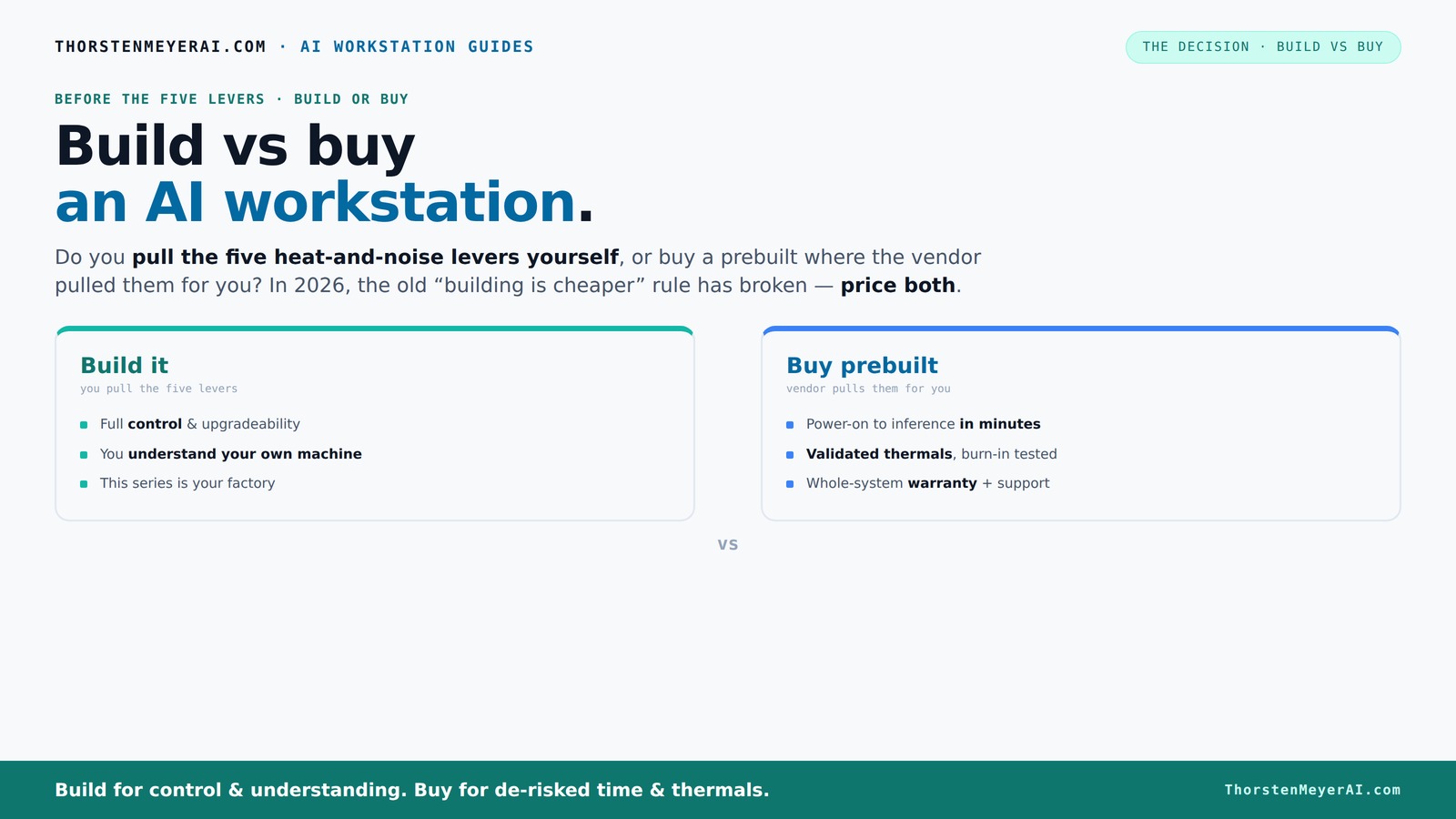
Build vs buy
an AI workstation.
The real question behind this whole series: do you pull the five heat-and-noise levers yourself, or buy a prebuilt where the vendor pulled them for you? And in 2026, the old “building is cheaper” rule has broken. Match your situation in Part 3.
Key Takeaways
- Component shortages in 2026 mean prebuilt AI workstations often match or beat DIY costs for similar specs.
- Prebuilts provide validated thermals, support, and quick deployment — ideal for time-sensitive projects.
- DIY offers customization and potential value per dollar but demands expertise, time, and troubleshooting skills.
- Focus on GPU VRAM, cooling, and power supply to ensure your AI system performs reliably under load.
- Deciding depends on your skills, project urgency, and whether you prioritize control or convenience.

WIWB Gaming PC Desktop Core I9-14900HX, RTX 5060 Ti 8G, 1TB NVME SSD
- Powerful Processor: Intel Core i9-14900HX with 24 cores
- High-Performance Graphics: GeForce RTX 5060 Ti 8GB GDDR7
- Fast Memory & Storage: 16GB DDR5 RAM and 1TB NVMe SSD
As an affiliate, we earn on qualifying purchases.
As an affiliate, we earn on qualifying purchases.
Why Building Your Own AI Workstation No Longer Always Saves Money
Building your own AI rig has traditionally been the way to stretch your dollar. But in 2026, the landscape has shifted. The skyrocketing prices for GPUs, DDR5 RAM, and SSDs have made DIY more expensive than you might think.
For example, a DIY build that used to cost around $1,000 now often hits $1,250 or more. You need to factor in not just parts, but also the time spent sourcing, assembling, troubleshooting, and tuning. This time investment is critical because it can significantly offset cost savings, especially if you’re not experienced. Moreover, the variability in component availability means that delays or compromises on parts can lead to suboptimal performance or stability issues.
Meanwhile, prebuilt vendors like Lambda or Puget have bought components in bulk, often passing savings directly to you. Their systems come validated, with thermal testing and warranty included — a level of reliability that’s tough to match on your own. They also handle the complex task of balancing components for optimal performance and thermal stability, reducing your risk of bottlenecks or failures.
So, the old rule — DIY is always cheaper — is broken. You must actually compare prices for your specific configuration. Sometimes, a prebuilt system ends up costing less, especially when factoring in your time, troubleshooting, and potential downtime. The tradeoff is between the perceived savings of DIY and the peace of mind, reliability, and time saved by choosing a prebuilt.
As an affiliate, we earn on qualifying purchases.
Who Pulls the Levers? The Real Difference Between Prebuilt and DIY
Think of building or buying as pulling five levers that control heat, noise, stability, and performance. A prebuilt vendor has already pulled these levers for you. They validate thermals through rigorous testing, tune fans for optimal noise levels, and often include advanced cooling options like water-cooling or custom heatsinks, which keep the system whisper-quiet under load. This means you get a system that’s optimized for performance and longevity without the guesswork.
If you build it yourself, you pull these levers. You select a GPU, undervolt it to reduce heat and power consumption ([see how to do that here](https://thorstenmeyerai.com/undervolt-gpu-local-inference/)), pick the right cooler, and set up airflow ([check this setup guide](https://thorstenmeyerai.com/quiet-case-fans-airflow/)). This process allows you to tailor the system to your specific noise and thermal preferences, which can be crucial in shared or quiet environments. Check this setup guide for more. However, it requires a good understanding of thermal dynamics, component compatibility, and the patience to iterate and troubleshoot. The tradeoff here is between achieving a perfectly tuned, silent system and the time and expertise needed to get there.
For example, a GPU like the RTX 4090 can generate significant heat and noise if not managed properly. Vendors tune these components at the factory for maximum efficiency, often including custom BIOS settings and cooling solutions that are hard to replicate at home. Do you want to spend hours tuning your system, or would you prefer a ready-to-rocket system from a vendor that’s optimized out of the box?
As an affiliate, we earn on qualifying purchases.
When Buying a Prebuilt AI Workstation Makes Total Sense
If you value plug-and-play convenience, a prebuilt system can be a game changer. These systems arrive with everything preinstalled — OS, AI frameworks like CUDA, PyTorch, TensorFlow — ready for immediate deployment. The importance of this lies in reducing setup time, ensuring compatibility, and minimizing configuration errors that can delay your project.
Plus, they come with validated thermals and warranties. Learn more about payment processing, merchant services, and fintech insights that can support your AI project needs. If your AI workload involves multi-GPU training or continuous inference, that reliability matters. For instance, BIZON systems often undergo 24–48 hours of stress testing before shipping, which ensures they operate at peak performance under sustained loads and reduces the risk of thermal throttling or hardware failure.
And if you’re running a small team or don’t have the time to tinker, a prebuilt system minimizes downtime and troubleshooting, letting you focus on your actual AI work. The upfront investment in support and validation can save you significant time and frustration, especially if your project timeline is tight or your technical expertise is limited.
As an affiliate, we earn on qualifying purchases.
When Building Your Own AI Workstation Is Still the Way to Go
Building your own rig is perfect if you crave full control and customization. Want a specific VRAM size? Or an ultra-quiet setup for recording or shared workspaces? Building your own custom AI workstation allows full control. DIY lets you pick each component — from the CPU to the case fans ([see quiet cooling options here](https://thorstenmeyerai.com/quiet-cpu-coolers-ai-workstation/)) — ensuring the system matches your exact needs.
It’s also ideal if you’re comfortable troubleshooting, swapping parts, or planning to upgrade in the future. For example, a hobbyist might choose a case with proprietary connectors but knows how to modify wiring or cooling solutions to keep noise low and performance high. This flexibility can be crucial if your requirements evolve or if you want to optimize for specific use cases like low-noise inference or energy efficiency.
Plus, some buyers find that with careful shopping and component selection, they can get more value per dollar—especially if they already own compatible parts or enjoy the building process. The key is understanding that this approach demands a certain level of expertise and patience but offers unmatched customization and learning opportunities. For more insights, visit cryptocurrency and blockchain news to stay updated on tech trends.
Cost, Performance, and Support — The Real Comparison
Here’s a quick side-by-side comparison to see what you really get, along with the deeper implications:
| Feature | Prebuilt AI Workstation | DIY Build |
|---|---|---|
| Cost | Often comparable or slightly higher due to support markup, but includes validated thermals and warranty. This means you pay a premium for reduced risk and time savings, which can be critical if your project timeline is tight or if you lack troubleshooting expertise. | Lower upfront cost, but potential hidden costs in troubleshooting, iterative testing, and time lost. If you’re experienced, this can be a cost-effective route; however, for many, the time and effort spent troubleshooting can outweigh initial savings. |
| Performance | Optimized at the factory for thermal stability and low noise, which ensures consistent performance under load and reduces thermal throttling risks. This reliability is vital for large AI models that demand sustained compute power. | Depends on your skill; can match or exceed prebuilt if you tune carefully. However, suboptimal cooling or improper component choices can lead to instability, throttling, or reduced lifespan. The tradeoff is the potential for a higher-performance system tailored precisely to your needs, if you have the expertise. |
| Support & Warranty | Includes professional support, warranty, and stress testing, which reduces your risk of hardware failure and minimizes downtime. This support network can be invaluable if your project is mission-critical or if you lack in-depth technical knowledge. | Self-managed; support depends on your expertise. Troubleshooting hardware issues can be time-consuming and frustrating, especially if you’re unfamiliar with complex system diagnostics. The upside is total control over upgrades and modifications, which some advanced users prefer. |
What Really Matters: Key AI Hardware Factors to Watch
Choosing the right hardware isn’t just about raw specs. For AI workloads, focus on:
- GPU VRAM: 24–48GB for training large models; 12–24GB for inference. The amount of VRAM directly impacts your ability to work with large datasets and complex models without frequent data swapping or memory errors, which can slow down your workflow and increase costs.
- System RAM: 64GB or more for large datasets. Sufficient RAM prevents bottlenecks during data preprocessing and model training, ensuring smoother performance and shorter training times.
- Storage: NVMe SSDs for fast data access. High-speed storage reduces data loading times, especially important when working with massive datasets or models.
- Thermals: Good airflow and cooling to prevent throttling. Overheating not only reduces performance but can also damage components, leading to costly repairs or replacements.
- Power Supply: Headroom for future upgrades. An undersized PSU can cause instability or limit your ability to upgrade components, potentially forcing you to replace the entire system sooner.
- Specialized hardware: NPUs or AI accelerators if supported. These can significantly boost performance for specific workloads but require compatible hardware and software support.
For example, a dedicated AI PC with a 48GB RTX 4090 and 128GB RAM can handle most demanding inference tasks without breaking a sweat, providing a balance of performance and future-proofing. Understanding these hardware factors helps ensure your system remains relevant and efficient over time, avoiding costly bottlenecks or upgrades.
Watch Out: Common Pitfalls That Can Cost You
Don’t fall into these traps, as they can undermine your entire investment:
- Poor thermal management: Leads to throttling, crashes, and reduced component lifespan. Always validate cooling solutions with stress tests and monitor temperatures during extended workloads. Neglecting this can result in significant performance drops and hardware failures, which are costly and time-consuming to fix.
- Proprietary parts: Can limit future upgrades and repairs. Sticking to standard connectors and modular components ensures you can replace or upgrade parts without being locked into a single vendor or proprietary ecosystem, saving money and hassle in the long run.
- Overestimating your skills: Tuning fans, undervolting GPUs, or modifying cooling solutions requires knowledge. Following detailed guides and understanding the thermal and power characteristics of your components is essential. Failing to do so can lead to instability, hardware damage, or reduced performance.
- Ignoring power headroom: Undersized PSUs cause instability under load and can damage components. Always select a power supply with at least 20-30% overhead to accommodate future upgrades and peak loads.
- Assuming all prebuilt are equal: Check vendor reviews, stress test results, and warranty terms before purchasing. A poorly tested or low-quality prebuilt can lead to thermal issues, hardware failures, or poor support, negating the convenience factor.
For instance, a case with inadequate airflow can lead to high temperatures and throttling, especially under sustained AI workloads. Consulting established case airflow guides [here](https://thorstenmeyerai.com/low-noise-pc-cases-airflow/) helps prevent these issues and ensures your system runs quietly and reliably.
Which Is Better for You? The Final Decision
If your time is valuable, support and reliability matter most, and you prefer a hassle-free setup, a prebuilt system likely makes more sense. It’s a ready-to-go solution with validated thermals and professional support, reducing your risk of downtime and technical headaches. This is especially important in production environments or when deadlines are tight.
If you enjoy tinkering, want complete control over every component, or have a tight budget, building your own can still be rewarding. Just remember: in 2026, the cost gap has narrowed due to market shifts, and the risks of DIY have grown — but so has your control. The choice ultimately depends on your technical skills, project timeline, and whether you prioritize convenience or customization.
Frequently Asked Questions
Is a prebuilt AI workstation worth it?
Yes, especially if you value quick setup, validated thermals, and professional support. It reduces troubleshooting time and gets you running faster.Is DIY cheaper than buying prebuilt?
Not always. Recent component shortages and bulk buying have made prebuilt systems often comparable or even cheaper for similar specs, especially when factoring in your time and effort.Will a prebuilt have the same performance as a custom build?
Generally, yes. Vendors tune thermals and optimize components for performance, often exceeding what most DIYers can achieve without extensive testing.How much more do you pay for convenience and support?
Typically a few hundred dollars, but it includes validated performance, warranties, and stress testing, which can save you costly troubleshooting later.Can I upgrade a prebuilt later?
It depends. Many prebuilt systems use proprietary parts, which can limit future upgrades. Always check the upgrade paths before buying.Conclusion
Choosing between building or buying your AI workstation isn’t just about saving money. It’s about aligning your skills, time, and project needs with the right approach. In 2026, the best choice depends more on your priorities than ever before.
Remember, an AI powerhouse is a tool — whether you build it yourself or buy it ready-made, make sure it’s tuned for your specific workload. That vivid, humming beast waiting in your corner? It’s all about how you want to get there.